Getting the most out of Claude and FinZot
A few settings in Claude make a big difference to how well it works with FinZot. They are in your Claude account, so FinZot cannot set them for you.
Use a paid Claude plan
Claude’s free plan can hit its usage limit quickly with FinZot, especially at higher thinking levels. A paid Claude plan gets much more out of the connector. That limit is Anthropic’s, separate from FinZot’s own tool-call limits below.
Turn thinking up
Use a model with thinking enabled and set the effort level to High or above. More complex analysis goes better with more thinking, a larger model such as Opus, or both.
Stop Claude asking before every step
Claude asks for your approval before each FinZot tool call until you tell it not to. In a chat you allow FinZot’s tools once, and in Cowork you choose a mode.
In a chat: always allow FinZot’s tools
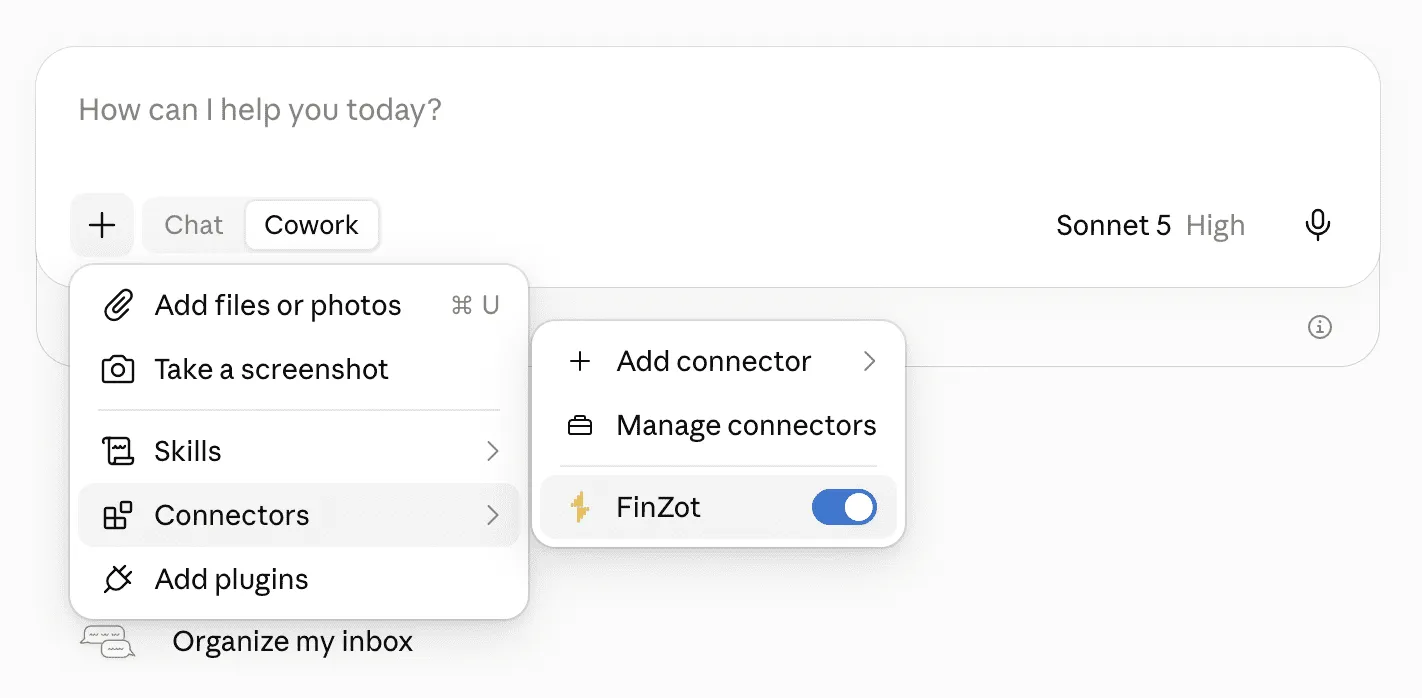
Open the + menu, click Connectors, then Manage connectors, and click FinZot. Under Tool permissions the tools sit in two groups, Read-only tools and Write/delete tools. Set both to Always allow. There are two settings to change and doing one leaves the other group prompting. The same screen is at Customize > Connectors on claude.ai, and Anthropic covers the options in Use connectors to extend Claude’s capabilities.
Write/delete covers more than saving. Importing a plan, creating one and editing one are all in that group, so leaving it on Needs approval means approving most of what Claude does. Those edits go to a working copy. The one tool that writes into your FinZot account is Publish plan to account, and you can set that tool on its own back to Needs approval while the rest of the group stays on always allow.
In Cowork: automatically approve
Cowork’s mode selector is in the chat box. Choose Automatically approve and Claude keeps working without stopping to ask, while it checks each action for safety and blocks anything it judges unsafe. On Team and Enterprise plans your admin decides whether that mode is offered. Anthropic covers the modes in Get started with Claude Cowork.
Habits that keep Claude accurate
Start every new chat by asking Claude to use FinZot, for example “Use FinZot to create a new plan” or “Use FinZot to analyze my plan”. Name the plan you want to work on, and Claude will list your plans and import the one you mean.
Avoid letting a conversation compact. If it happens, start a fresh chat. FinZot runs a number of checks to keep Claude from hallucinating, and one of them tracks which context Claude has loaded. Compaction makes that harder to track, which can make Claude less accurate.
Claude works on the version of your plan that has synced to the cloud. If you have FinZot open in another tab while Claude is editing, let the app finish syncing before you ask Claude to save back over the plan.
FinZot’s tool-call limits
FinZot counts each tool call Claude makes. A free account can use the connector for a limited time, with a smaller allowance. A Plus account gets much higher limits, counted per 5 hours and per week. When a limit is nearly used up, FinZot tells Claude how many calls are left. When it is reached, FinZot tells Claude which limit was reached and when it resets, in UTC, and refuses tool calls until then. On a free account, upgrading to Plus raises the limit starting with the next tool call.
If Claude answers without FinZot
FinZot lives in the + menu. Once you have a connector installed that menu is labeled Connectors rather than Add connector. The toggle next to FinZot switches it on and off, and nothing reaches your account while it is off.